This guide explains how to operate a HOPPE-brand multipoint door handle hardware for both hinged and sliding doors. The steps below help you use the correct handle sequence, reduce wear, and confirm smooth, reliable locking performance.
Who this is for: homeowners, installers, and maintenance teams working with multipoint door hardware.
Key Takeaways
-
Hinged vs. sliding: multipoint handle operation differs by door type.
-
Use the correct sequence: forcing the handle can cause binding or incomplete engagement.
-
Stiff handle is a signal: stiffness usually points to alignment, strike placement, or over-tightened trim.
-
Locking vs. Unlocking: Multipoint locks operate differently from standard door handles.
Multipoint handle sets operate more than one locking point along the edge of your door. Instead of securing the door at a single latch, the handle action locks and unlocks multiple points to improve alignment and security when operated correctly. Here are some examples of our HOPPE Multipoint lock products.
Hinged HOPPE Door Multipoint Handle Operation
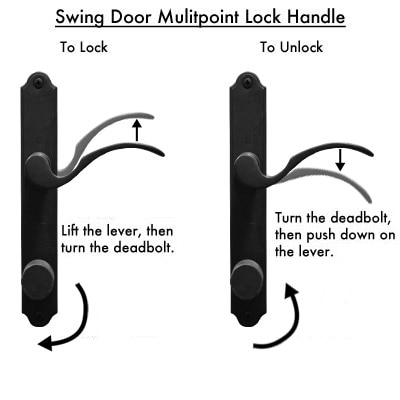
How to lock a HOPPE hinged door:
-
Close the door fully.
-
Lift the handle to engage the multipoint locking points.
-
Use the thumbturn or key (if equipped) to extend the deadbolt.
Lifting the handle first ensures the locking points are positioned before the deadbolt is driven.
How to unlock a HOPPE hinged door
-
Retract the deadbolt using the thumbturn or key.
-
Press the handle down to retract the locking points.
-
Open the door.
Lowering the handle after retracting the deadbolt helps prevent dragging or binding.
Common mistake: trying to force the handle down before retracting the deadbolt can cause binding and premature wear.
What to watch for
If the handle will not lift smoothly with the door closed, the door may be slightly out of alignment or the strike or keep locations may not be centered to the locking points.
Sliding Door HOPPE Multipoint Handle Operation
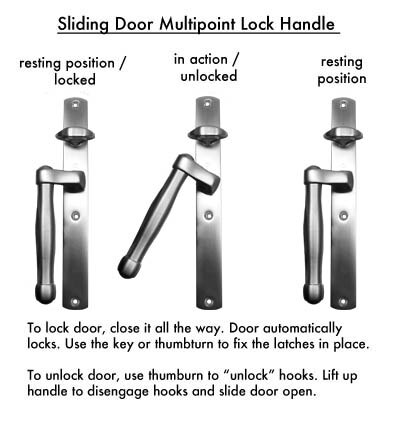
How to lock a HOPPE sliding door:
-
Keep the handle down in the resting position while the panel is closed.
-
Ensure the panel is fully seated so the locking points align properly with their strike areas.
How to unlock a HOPPE sliding door:
-
Unlock using the thumbturn or key (if equipped).
-
Lift the handle to disengage the locking points.
-
Slide the door open.
Lifting the handle after unlocking helps release the locking elements before panel movement.
What to watch for
If the handle is difficult to lift, confirm the panel is fully seated in the closed position and that the door is not racking in the frame.
Common Issues and Quick Checks
Handle works with the door open but not when closed
This often points to door alignment, strike alignment, or trim and spindle positioning. Confirm the door is square in the frame and fully closed before lifting the handle.
Handle feels stiff or requires extra force
Stiffness usually indicates misalignment or the locking points contacting strike areas. Check for rubbing at the lock edge, confirm fasteners are not over-tightened, and verify the panel is seated correctly in the frame.
Locking points do not fully engage
Confirm the door is closed firmly and aligned. If the system has adjustable components, re-check alignment between the locking points and the strike or keep locations.
Give us a call or fill out our multipoint lock identifier form and we'd be happy to assist you.
Frequently Asked Questions
Do hinged (swing) and sliding multipoint handles operate the same way?
No. Hinged doors typically use a lift-and-lock sequence with a deadbolt, while sliding doors require unlocking first, then lifting the handle to release the locking points before sliding the panel.
Why does the handle lift easily when open but not when closed?
This usually indicates the door is not square in the frame or the locking points are not centered to their strike or keep positions when the door is closed.
Can any handle be used on a multipoint lock?
No. Multipoint systems require handle sets designed for the specific lock configuration, spindle type, and trim preparation.
